怎么记 shadow 日志
BASI Level 1 要求你在课程结束之后完成 35 小时 shadowing。在 SnowNavi,每跟完一节课,你在会员中心记一条日志,系统请带课教练确认;确认了的时长自动累计。这页讲清楚怎么填、教练那边看到什么、时长怎么算、做完之后会发生什么。
去会员中心记一条 →整体流程
- 跟一节课你在任何一家雪校跟着教练上课:观察、协助,或者在教练监督下带一小段。
- 课后记一条日志你会员中心 →「我的 Shadowing」→「+ 新建 shadow 日志」,填完提交。
- 系统给带课教练发确认邮件SnowNavi提交的那一刻自动发出,邮件里有一条专属链接。
- 教练点链接确认带课教练教练不用注册,看一眼日志、确认(可以把时长调低)或说明不属实。
- 时长计入进度自动确认的时长马上出现在你的进度条里,你也会收到一封通知邮件。
- 满 35 小时,SnowNavi 核对并标记完成SnowNavi我们把确认过的记录整理成 log 报告,供签字和提交 BASI 用。
- 五项都完成 → 自动发证自动会员资料的「教练资质」里会出现一张已认证的 BASI Level 1 证。
考核五项
五项都完成才算拿到 Level 1。会员中心里每项前面是 ✓(已完成)或 ○(未完成),由 SnowNavi 按结果更新。
记一条 shadow 日志
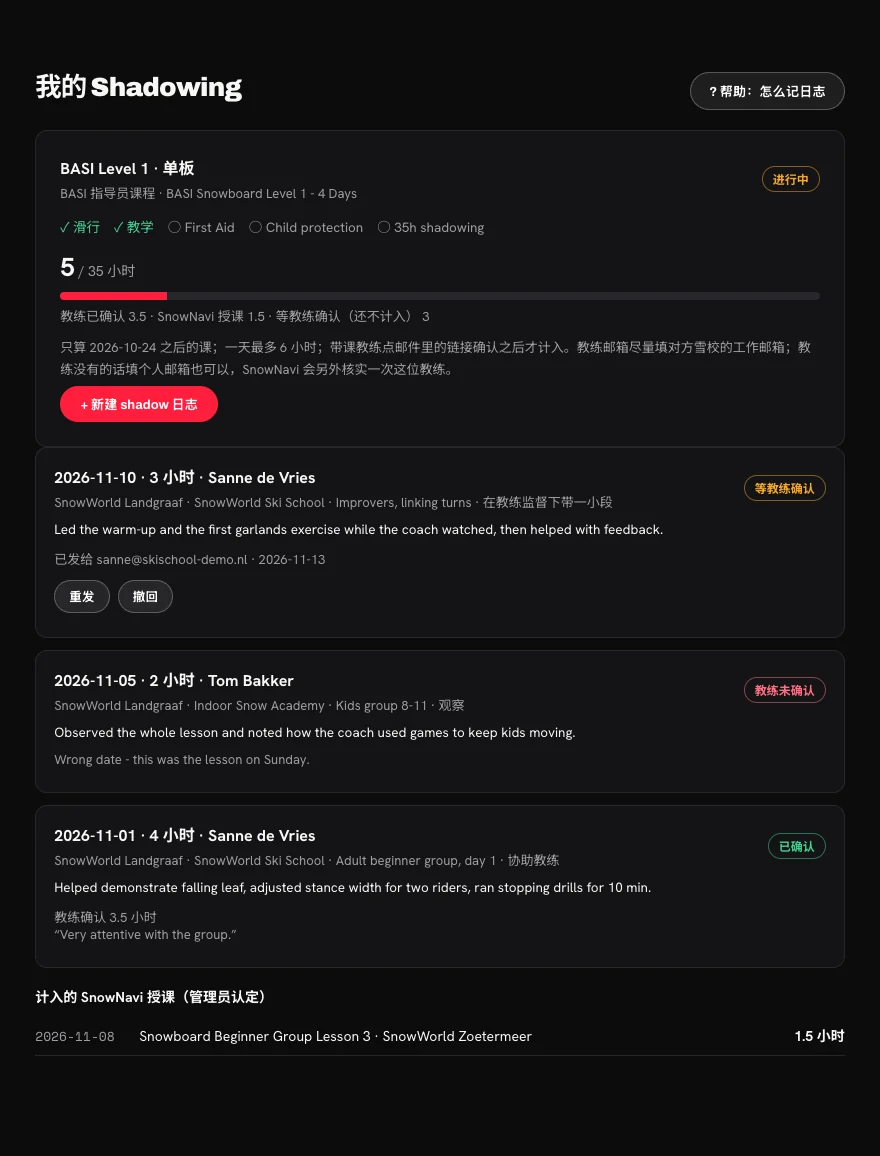
会员中心往下翻到「我的 Shadowing」:上面是你的五项和进度,下面是你记过的每一条日志。点「+ 新建 shadow 日志」打开表单。
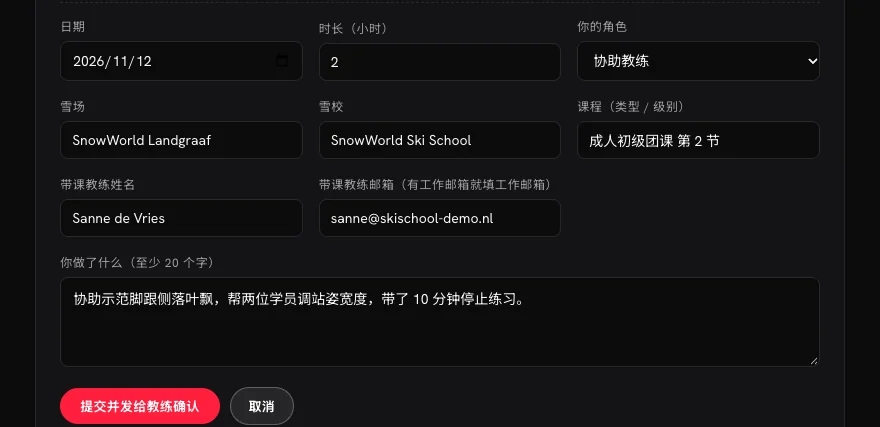
每一栏怎么填
| 栏目 | 说明 |
|---|---|
| 日期 | 跟课那一天。只能选课程结束日之后、且不晚于今天的日期(BASI 规定课程结束之前的时长不算)。 |
| 时长(小时) | 实际跟课的时间,按一刻钟(0.25 小时)填,比如 1.5、2.75。一天合计最多 6 小时。 同一天跟同一位教练上了两节,合成一条写,时长加起来。 |
| 你的角色 | 观察:全程在旁边看。协助教练:帮忙示范、帮学员调整。在教练监督下带一小段:教练在场,你带了一部分。 |
| 雪场 / 雪校 / 课程 | 在哪里、哪家雪校的课、课程类型和级别。例:SnowWorld Landgraaf · SnowWorld Ski School · 成人初级团课第 2 节 |
| 你做了什么 | 至少 20 个字。这段会原样给教练看,也会出现在最终的 log 报告里,所以写具体:这节课教什么、你负责哪部分、你观察到了什么。 |
| 带课教练姓名 | 这节课的带课教练,写全名。 |
| 带课教练邮箱 | 确认邮件就发到这里。教练有雪校的工作邮箱就填工作邮箱;没有的话填个人邮箱也可以,SnowNavi 会另外核实一次这位教练(每位教练只需核实一次)。 不能填你自己的邮箱,也不能填同期还在考核中的学员的邮箱。 |
「你做了什么」写成什么样
带课教练怎么确认
- 你一提交,教练就会收到一封英文邮件,标题是 Please confirm shadowing hours for(你的名字),回复会直接到 SnowNavi。
- 教练点邮件里的 Review and confirm 按钮,不用注册、不用登录,就能看到你这条日志的全部内容。
- 如果属实:教练填上自己的全名、所属雪校、滑雪学校校长的邮箱(只用来备案,我们不会给校长发信),可以把时长调低(不能调高),勾选声明后确认。
- 如果不属实:教练选「No / not as described」,可以写一句原因,这句话你能看到。
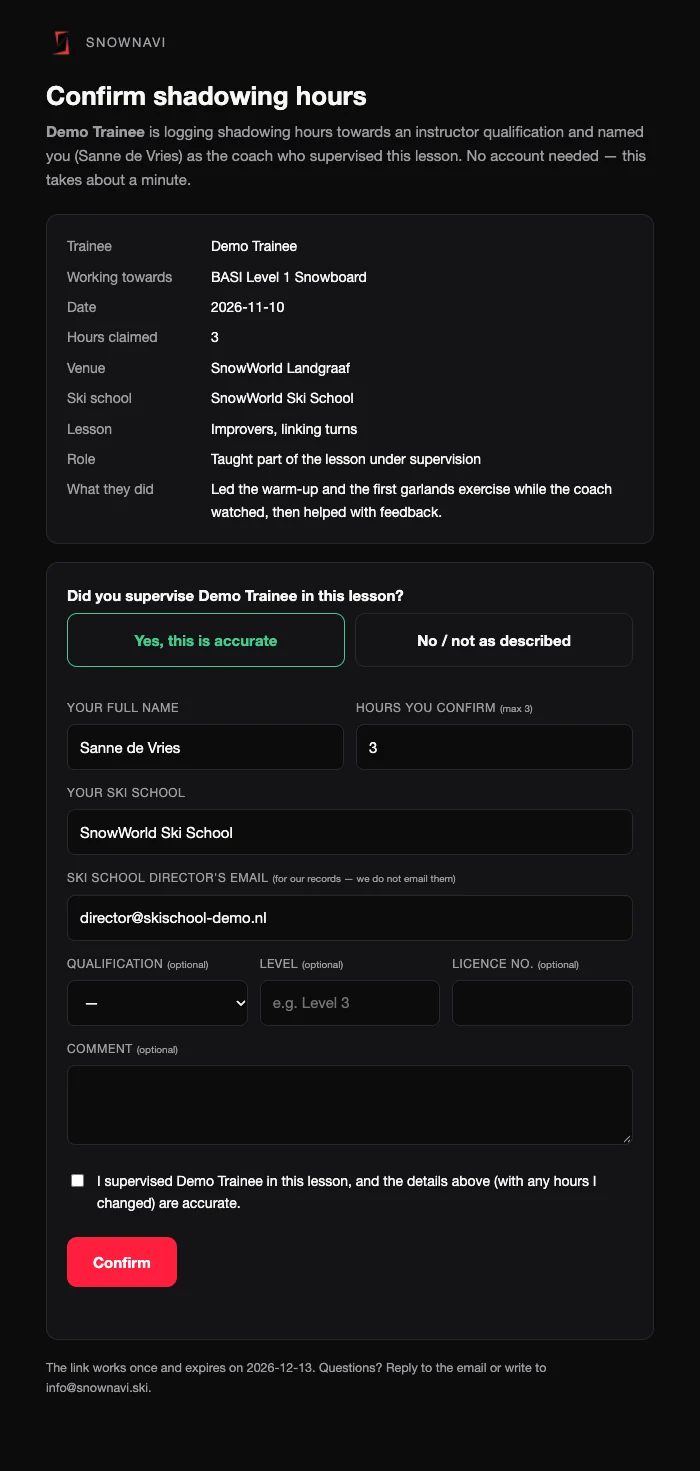
链接只能用一次,30 天后失效。教练做了决定,你会收到一封邮件通知,会员中心里这条的状态也会跟着变。
日志状态和操作
| 状态 | 意思 | 你可以做什么 |
|---|---|---|
| 等教练确认 | 邮件已发出,教练还没处理。不计入时长。 | 重发:换一条新链接再发一次,旧链接立刻作废(两次之间隔 10 分钟,一条最多发 5 次)。 撤回:信息填错了就撤回,再重新建一条。 |
| 链接已过期 | 30 天内教练没处理。 | 点重发,教练会收到一条新链接。 |
| 已确认 | 教练确认了,按教练确认的时长计入。 | 不用做什么。有错的话联系 SnowNavi。 |
| 教练未确认 | 教练说这条不属实,下面会显示教练写的原因。 | 看原因;如果是信息写错了,重新建一条正确的。 |
| 已撤回 | 你自己撤回的。 | — |
| 已作废 | SnowNavi 核对后作废了,不计入。 | 有疑问联系我们。 |
如果某条下面写着「邮件没发出去」,点「重发」就好。
时长怎么算
- 进度 = 教练已确认的时长 + SnowNavi 授课时长。「等教练确认」的只显示、不计入。
- 教练确认时调低了,就按调低后的算。
- SnowNavi 授课:课程结束后,你如果作为教练在 SnowNavi 上课(签到身份是教练),SnowNavi 可以把这些课计入你的时长,会显示在「计入的 SnowNavi 授课」里。这部分不用你建日志。
- 同一天的日志和授课加起来最多 6 小时。
- 只有课程结束日之后的课才算。
做满之后
- 进度到 35 小时后,SnowNavi 会核对你的记录,然后把「35h shadowing」标为完成。完成后不能再新建日志。
- SnowNavi 会把确认过的日志和计入的授课整理成一份 log 报告,供签字和提交 BASI 用。具体怎么提交,我们会单独跟你确认。
- BASI 规定:如果你已经报了 Level 2,Level 1 的时长要在 Level 2 开课前 5 天送到 BASI(以 BASI 最新要求为准),所以请提前做完。
- 五项全部完成后,你的会员资料「教练资质」里会自动出现一张已认证的 BASI Level 1 证,可以用来解锁 pro deal 里的教练折扣。
常见问题
- 教练说没收到邮件?
- 先请教练看一下垃圾邮件;再核对一下你填的邮箱。邮箱没错就点「重发」。邮箱写错了:撤回这条,重新建一条正确的。
- 日志写错了怎么办?
- 教练还没确认:撤回后重新建。已经确认了:联系 SnowNavi,我们作废那条之后你再重建。
- 可以记在别的雪校跟的课吗?
- 可以,雪校不限,只要是课程结束之后、有教练带的课。
- 教练没有工作邮箱怎么办?
- 填教练的个人邮箱就行。时长照常计入,SnowNavi 会另外核实一次这位教练,不影响你的进度。
- 课程结束前跟的课算吗?
- 不算。BASI 规定只算课程结束之后的时长,系统里也选不了那之前的日期。
- 一天跟了 8 小时,怎么只能记 6 小时?
- 系统一天最多记 6 小时(日志和授课合计)。
- 我在 SnowNavi 自己带课,要建日志吗?
- 不用。SnowNavi 可以根据签到记录把这些课计入你的时长,计入的会出现在「计入的 SnowNavi 授课」里。
- 还有别的问题?
- 发邮件到 info@snownavi.ski。
How to log your shadowing
BASI Level 1 asks for 35 hours of shadowing after your course. At SnowNavi you log each lesson in your member centre, we ask the supervising coach to confirm it, and confirmed hours add up automatically. This page explains what to fill in, what the coach sees, how hours are counted and what happens when you are done.
Log a lesson in the member centre →How it works
- Shadow a lessonyouAt any ski school, alongside a coach: observing, assisting, or teaching part of it under supervision.
- Log it afterwardsyouMember centre → "My shadowing" → "+ New shadow log", fill it in and submit.
- We email the coachSnowNaviThe moment you submit, the coach gets an email with a personal confirmation link.
- The coach confirmscoachNo account needed: they read your entry and confirm it (they may lower the hours) or say it is not accurate.
- Hours are addedautomaticConfirmed hours show up in your progress bar straight away, and you get an email.
- At 35 hours SnowNavi reviews and signs offSnowNaviWe compile your confirmed entries into a log report for signature and submission to BASI.
- All five done → certificate addedautomaticA verified BASI Level 1 certificate appears under "Instructor certificates" in your profile.
The five requirements
You complete Level 1 when all five are done. Each one shows ✓ (done) or ○ (not yet) in your member centre; SnowNavi updates them.
Logging a lesson
Scroll to "My shadowing" in your member centre: your five requirements and progress are at the top, every entry you logged below. Press "+ New shadow log" to open the form.
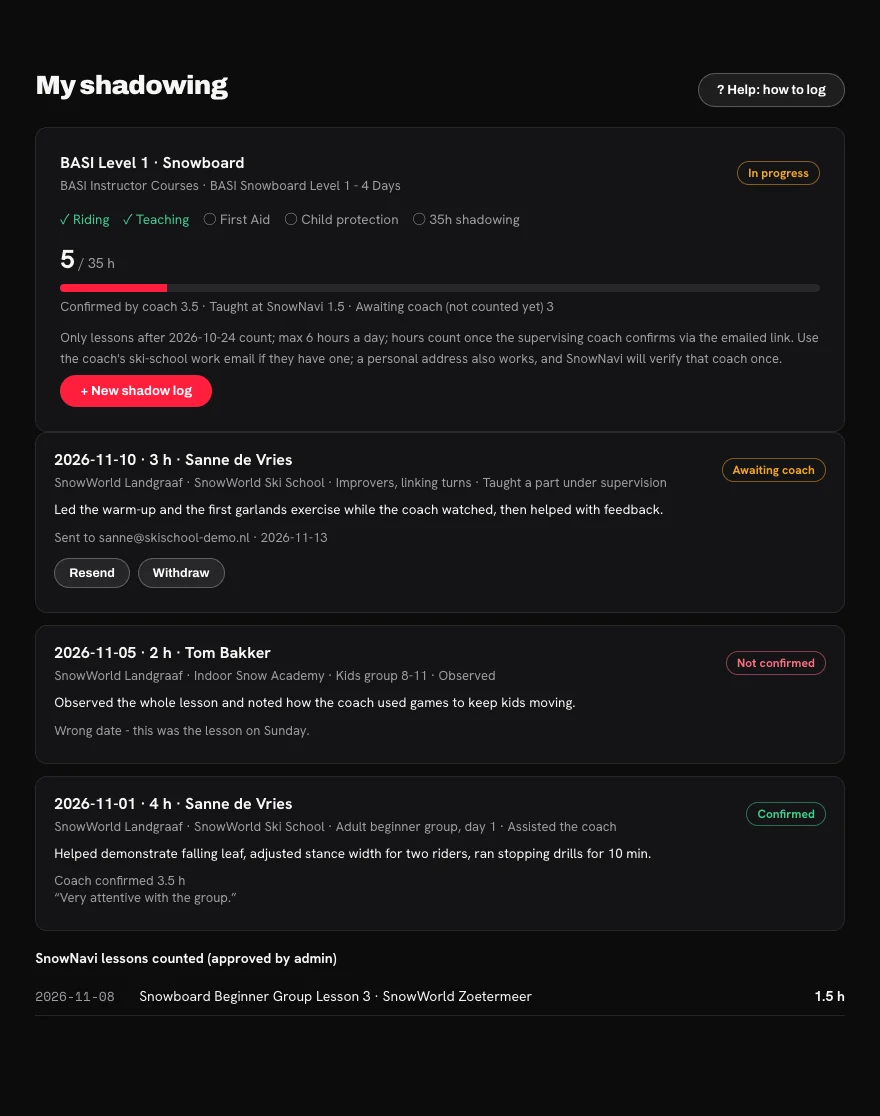
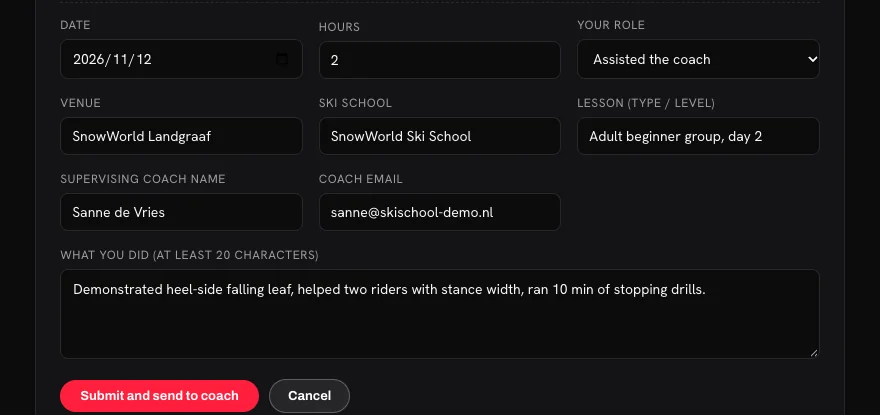
Field by field
| Field | What to enter |
|---|---|
| Date | The day of the lesson. Only dates after your course end date and up to today are accepted (BASI does not count hours before the course ends). |
| Hours | Time you actually spent in the lesson, in quarter hours (1.5, 2.75…). Six hours a day at most. Two lessons with the same coach on the same day? Log them as one entry and add up the hours. |
| Your role | Observed: watched the whole lesson. Assisted the coach: helped demonstrate, helped riders. Taught a part under supervision: the coach was there and you led a part. |
| Venue / ski school / lesson | Where, which school, and the type and level of lesson. e.g. SnowWorld Landgraaf · SnowWorld Ski School · adult beginner group, day 2 |
| What you did | At least 20 characters. The coach sees this word for word, and it goes into your final log report, so be specific: what the lesson covered, what you did, what you noticed. |
| Coach name | The supervising coach's full name. |
| Coach email | The confirmation email goes here. Use their ski-school work email if they have one; otherwise a personal address works too and SnowNavi will verify that coach once. You cannot enter your own email or that of a fellow trainee who is still in progress. |
What a good "what you did" looks like
How the coach confirms
- When you submit, the coach gets an email titled Please confirm shadowing hours for (your name). Replies go to SnowNavi.
- They press Review and confirm. No account or login — they see your whole entry.
- If it is accurate they enter their full name, their ski school and the ski school director's email (for our records only — we don't email the director), may lower the hours (never raise them), tick the declaration and confirm.
- If not, they choose "No / not as described" and can add a reason, which you will see.
The link works once and expires after 30 days. When the coach answers you get an email, and the entry's status changes in your member centre.
Log statuses
| Status | Meaning | What you can do |
|---|---|---|
| Awaiting coach | Email sent, the coach hasn't answered yet. Not counted. | Resend: sends a fresh link and the old one stops working (10 minutes apart, up to 5 sends per entry). Withdraw: if something is wrong, withdraw it and log it again. |
| Link expired | The coach didn't answer within 30 days. | Press Resend to send them a new link. |
| Confirmed | Counted, at the hours the coach confirmed. | Nothing. If something is wrong, contact SnowNavi. |
| Not confirmed | The coach said it isn't accurate; their reason is shown. | Read the reason; if you made a mistake, log a corrected entry. |
| Withdrawn | You withdrew it. | — |
| Voided | SnowNavi voided it after review. Not counted. | Contact us if you have questions. |
If an entry says "Email did not go out", just press Resend.
How hours count
- Progress = hours confirmed by coaches + hours taught at SnowNavi. Entries awaiting the coach are shown but not counted.
- If the coach lowered the hours, the lower number counts.
- Teaching at SnowNavi: lessons you teach at SnowNavi after your course (checked in as coach) can be counted by SnowNavi. They appear under "SnowNavi lessons counted" — no log needed.
- Entries and SnowNavi lessons together count at most 6 hours per day.
- Only lessons after your course end date count.
When you reach 35 hours
- SnowNavi reviews your entries and marks "35h shadowing" as done. After that you can't add new entries.
- We compile your confirmed entries and counted SnowNavi lessons into a log report for signature and submission to BASI. We'll confirm the submission details with you.
- BASI rule: if you have booked Level 2, your Level 1 hours must reach BASI 5 days before the Level 2 course starts (check BASI's current requirements) — so finish in good time.
- When all five requirements are done, a verified BASI Level 1 certificate appears in your profile and unlocks the instructor discounts on the pro deals page.
FAQ
- The coach says the email never arrived.
- Ask them to check spam, and check the address you entered. If it's right, press Resend. If it's wrong, withdraw the entry and log it again.
- I made a mistake in an entry.
- Not confirmed yet: withdraw it and log it again. Already confirmed: contact SnowNavi; we void it and you log a corrected one.
- Can I log lessons at other ski schools?
- Yes, any school — as long as it is after your course and a coach supervised it.
- The coach has no work email.
- Use their personal address. The hours count as normal; SnowNavi verifies that coach once.
- Do lessons before my course ended count?
- No. BASI only counts hours after the course, and the form won't accept earlier dates.
- I shadowed 8 hours in one day but can only log 6.
- The system counts at most 6 hours a day (entries and SnowNavi lessons together).
- I teach at SnowNavi — do I need to log those lessons?
- No. SnowNavi can count them from the check-in records; counted lessons appear under "SnowNavi lessons counted".
- Anything else?
- Email info@snownavi.ski.